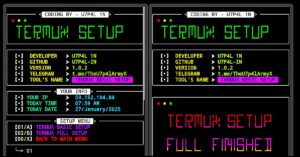
TERMUX-SETUP is a Python-based tool that automatically configures a fresh Termux environment by installing essential packages, updating the system, cleaning unnecessary files, displaying system information, and performing other basic setup tasks. It helps you prepare Termux with a single script instead of installing packages one by one.
Installation Commands
Run the following commands one by one in Termux to install the TERMUX-SETUP tool.
Update and upgrade Termux packages.
pkg update && pkg upgrade -y
Install Git.
pkg install git -y
Install Python.
pkg install python -y
Install the required Python module.
pip install requests
Clone the TERMUX-SETUP repository.
git clone --depth=1 https://github.com/U7P4L-IN/TERMUX-SETUP.git
Move to the project directory.
cd TERMUX-SETUP
TERMUX-SETUP tool is now installed and ready to use.
Usage Commands
After installing TERMUX-SETUP tool, run the following command to start the tool.
Run the tool.
python3 SET.py
The tool will display the following menu:
╭───────────────────────────── < MAIN MENU > ─────────────────────────────╮
│ 【01/A】TERMUX BESIC PKG SETUP                                          │
│ 【02/B】ADD BANNER IN TERMUX                                            │
│ 【03/C】REPORT FOR ANY BUGS                                             │
│ 【00/X】EXIT PROGRAMME                                                  │
╰─────────────────────────────────────────────────────────────────────────╯
- Enter
01orAto install the basic Termux packages. - Enter
02orBto add a custom banner to your Termux terminal. - Enter
03orCto report bugs or issues related to the tool. - Enter
00orXto exit the program.
Note: During the setup process, the script may automatically open the developer’s GitHub profile in your default web browser. This is part of the tool’s behavior and does not affect the installation.
Overview
TERMUX-SETUP is a simple tool that helps you set up Termux in just a few steps. It is easy to use, beginner-friendly, and saves time by installing basic packages and performing common setup tasks from one menu.