AstraNmap is a simple menu-driven wrapper for Nmap that makes network scanning easier from the terminal. Instead of remembering different Nmap commands, you can choose from a numbered menu to perform common scanning tasks. It is beginner-friendly and help you learn basic network reconnaissance using simple options.
Installation Commands
Use the following commands to install AstraNmap in Termux, Just copy and run these commands one by one.
Update Termux packages.
pkg update && pkg upgrade -y
Install Git and Nmap.
pkg install git nmap -y
Clone the AstraNmap repository.
git clone https://github.com/your-repository/AstraNmap.git
Move into the project directory.
cd AstraNmap
Run AstraNmap.
bash astranmap.sh
AstraNmap is now installed and ready to use.
Usage Commands
After installing AstraNmap, start the tool using the following command:
bash astranmap.sh
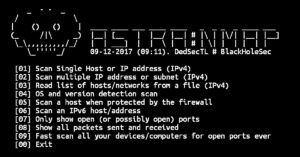
After running the tool, the following menu will appear:
[01] Scan Single Host or IP address (IPv4)
[02] Scan multiple IP address or subnet (IPv4)
[03] Read list of hosts/networks from a file (IPv4)
[04] OS and version detection scan
[05] Scan a host when protected by the firewall
[06] Scan an IPv6 host/address
[07] Only show open (or possibly open) ports
[08] Show all packets sent and received
[09] Fast scan all your devices/computers for open ports ever
[00] Exit

astranmap >- 01 – Scan a Single Host: Scan one IP address or hostname.
- 02 – Scan Multiple Hosts: Scan multiple IP addresses or a subnet.
- 03 – Scan Targets from a File: Scan a list of targets saved in a file.
- 04 – Detect OS and Services: Find the operating system and service versions of the target.
- 05 – Scan Behind a Firewall: Scan a host that is protected by a firewall.
- 06 – Scan an IPv6 Host: Scan a target using an IPv6 address.
- 07 – Show Open Ports Only: Display only the open ports found during the scan.
- 08 – Show Packets: View all packets sent and received during the scan.
- 09 – Fast Scan: Quickly scan the target for common open ports.
- 00 – Exit: Close AstraNmap.
Choose the option you need, enter the required target information, and AstraNmap will perform the selected scan in the terminal.
Overview
AstraNmap is a simple tool that helps you perform different Nmap scans from an easy-to-use menu. It saves time and makes network scanning easier, especially for beginners learning how to use Nmap in Termux.