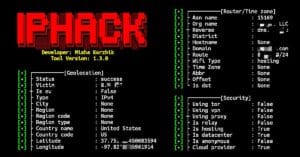
IpHack is a simple Python tool used to gather information about IP addresses and websites. It can check IP address details, find the IP address of a domain, and display information about your own IP address. It also provides features for checking website subdomains and directories.
Installation Commands
You can install IpHack in Termux using Python and a few required packages. Run the following commands one by one to download and install the tool.
Update Termux packages.
pkg update && pkg upgrade -y
Install Python, wget, and unzip.
pkg install python wget unzip -y
Clone the IpHack repository.
git clone https://github.com/mishakorzik/IpHack
Go to the IpHack directory.
cd IpHack
Install Required pip module.
pip install pyproxify iphack rich colorama requests
Run the installation script.
bash install.sh
IpHack is now installed and ready to use.
Usage Commands
After installing IpHack, start Python and import the IpHack module first. You can then use different commands to check IP addresses and website information.
Start Python.
python
Import IpHack.
from iphack import ip
Check an IP address.
ip.address("8.8.8.8")Find the IP address of a domain.
ip.domain("google.com")Check your own IP address.
ip.my()
Find website subdomains.
ip.subdomains("example.com")Find website directories.
ip.directory("example.com")You can use these commands after importing the IpHack module to check IP addresses and gather basic information about websites.
Overview
IpHack is a simple Python tool for checking IP addresses and website information. It provides different commands for finding IP details, domains, subdomains, and directories from the terminal.