YTConverter is a simple command-line tool that helps you download YouTube videos and audio from the Termux terminal. It provides an interactive menu for downloading single videos, MP3 audio, and multiple videos or audio files. You can also choose the download quality before saving the file.
Installation Commands
Follow the commands below to install YTConverter in Termux. Copy and execute each command in the given order.
Update Termux packages.
pkg update && pkg upgrade -y
Install the required packages.
pkg install git python ffmpeg -y
Clone the YTConverter repository.
git clone https://github.com/kaifcodec/ytconverter
Go to the YTConverter directory.
cd ytconverter
Install the required Python packages.
pip install -r requirements.txt
Go to the standalone directory.
cd standalone
Run the installation script.
bash install.sh
Run the tool.
python ytconverter.py
YTConverter is now installed and ready to use.
YTConverter Menu
Run the tool.
python ytconverter.py
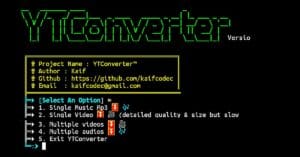
The tool will display the following menu:
- Single Music MP3 – Download a single YouTube video as an MP3 file.
- Single Video – Download a single YouTube video with selectable quality.
- Multiple Videos – Download multiple YouTube videos.
- Multiple Audios – Download multiple YouTube videos as MP3 files.
- Exit – Close the YTConverter tool.
Choose any option from the menu. The tool will ask you to enter the YouTube video or audio URL that you want to download.
After entering the URL, the tool will display all available video or audio quality options. Select any available quality option by entering its number (for example, 1 to 24).
The tool will then download the selected video or audio and save it to your device’s internal storage in the Download folder.
Overview
YTConverter is a simple tool for Termux that allows you to download YouTube videos and audio files using easy commands. It provides different download options, lets you choose the quality before downloading, and automatically saves the downloaded files in your device’s internal storage Download folder.